

Short answer
An app like Uber is made of three parts: one for the rider, one for the driver and an admin panel. An MVP for one city usually takes 4–16 weeks. A ready-made white-label app can go live in a few days. But then you get the same product as your competitors, and you can change almost nothing.
Copying Uber as a whole makes no sense. In Q3 2026 it handled more than 4 billion trips, and 215 million people use it every month. Uber is already launching driverless cars, and about 700 of them are expected on the platform by the end of the year. You don't want to fight a player like that head-on.
The ones who make money take the Uber model and bring it into a niche. That can be medicine delivery, tow trucks, B2B logistics or calling a handyman. Start with one niche and one city, build an MVP in 4–16 weeks, and then grow on real data.
How an app like Uber works
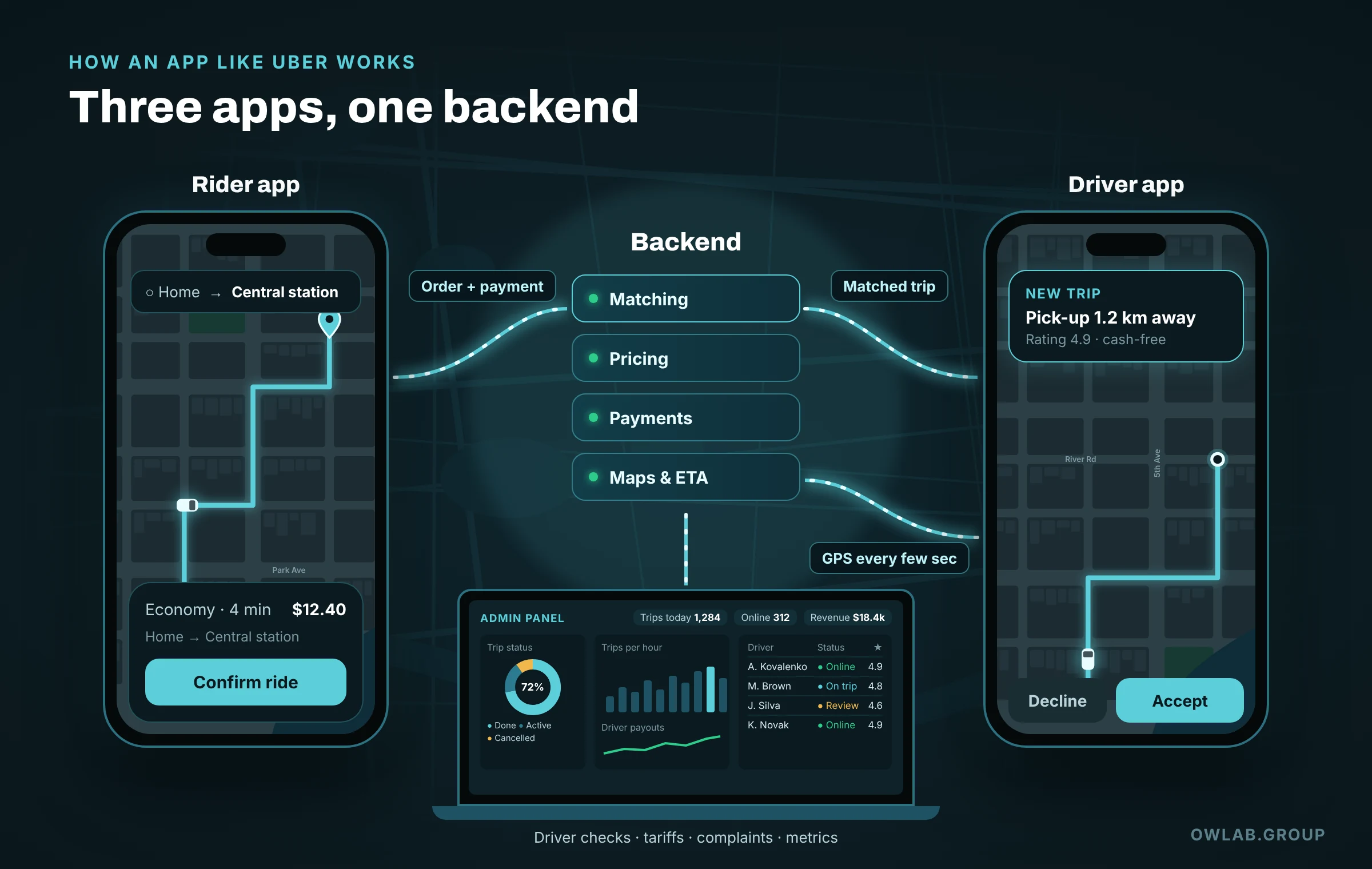
From the outside it is one "Order" button. In reality it is three separate products that work with one backend.
- The rider app. A person enters where to go, sees the price and pick-up time, follows the car on the map and pays.
- The driver app. A driver goes online, accepts orders, drives with navigation and sees their earnings.
- The admin panel. The team checks drivers, sets tariffs, handles complaints and watches the numbers.
All the hard work happens on the backend. It receives GPS points from every driver several times a minute. It picks the best car for each order. It calculates the price and pick-up time. It holds the money on the card and splits it between the driver and the platform.
Here is a fun detail. Uber splits the city map into hexagons and checks how many orders and free drivers there are in each one. Dynamic pricing is built on top of that. Uber open-sourced this system under the name H3, and anyone can use it for free. So part of Uber's technology is available to every startup today.
Which features you need at launch and which can wait
The most common mistake in these projects is trying to build everything Uber has at once. An MVP only needs what a ride cannot happen without.
Needed in the MVP
- Sign-up with a phone number for riders and drivers.
- Ordering with an address and an upfront price.
- Matching with the nearest free driver.
- A live map with the car.
- Payment by card, Apple Pay and Google Pay.
- Ratings and trip history.
- Push notifications.
- An admin panel for driver checks and tariffs.
Can be added after launch
- Dynamic pricing at peak hours.
- Shared rides and multiple stops.
- Scheduled rides.
- Different car classes.
- Promo codes, subscriptions and a referral program.
- Corporate accounts.
- An SOS button and trip sharing with family.
- Demand analytics on the map.
Every feature from the second list adds weeks of work and new cases to test. So add it when the data shows that people need it.
Not sure what to put in the first version?
Tell us about your niche. We will help you choose the features for your MVP and show what can wait.
Tech stack in 2026
To launch a service in one city, you don't need microservices or your own maps. Here is the set we would recommend for an MVP.
- Mobile apps. Flutter or React Native. One codebase for iOS and Android, and you need it twice, because there are two apps.
- Backend. Node.js, Python or Go. WebSocket for real-time updates.
- Data. PostgreSQL with PostGIS for addresses and zones, Redis for fast search of nearby drivers.
- Maps and routes. Google Maps Platform or Mapbox. For zones and pricing you can use H3 from Uber itself.
- Payments. Stripe Connect or a local acquirer that can split a payment between the driver and the platform.
- Communication. Twilio or similar for SMS and masked phone numbers, Firebase for push notifications.
AI agents and AI features you can add
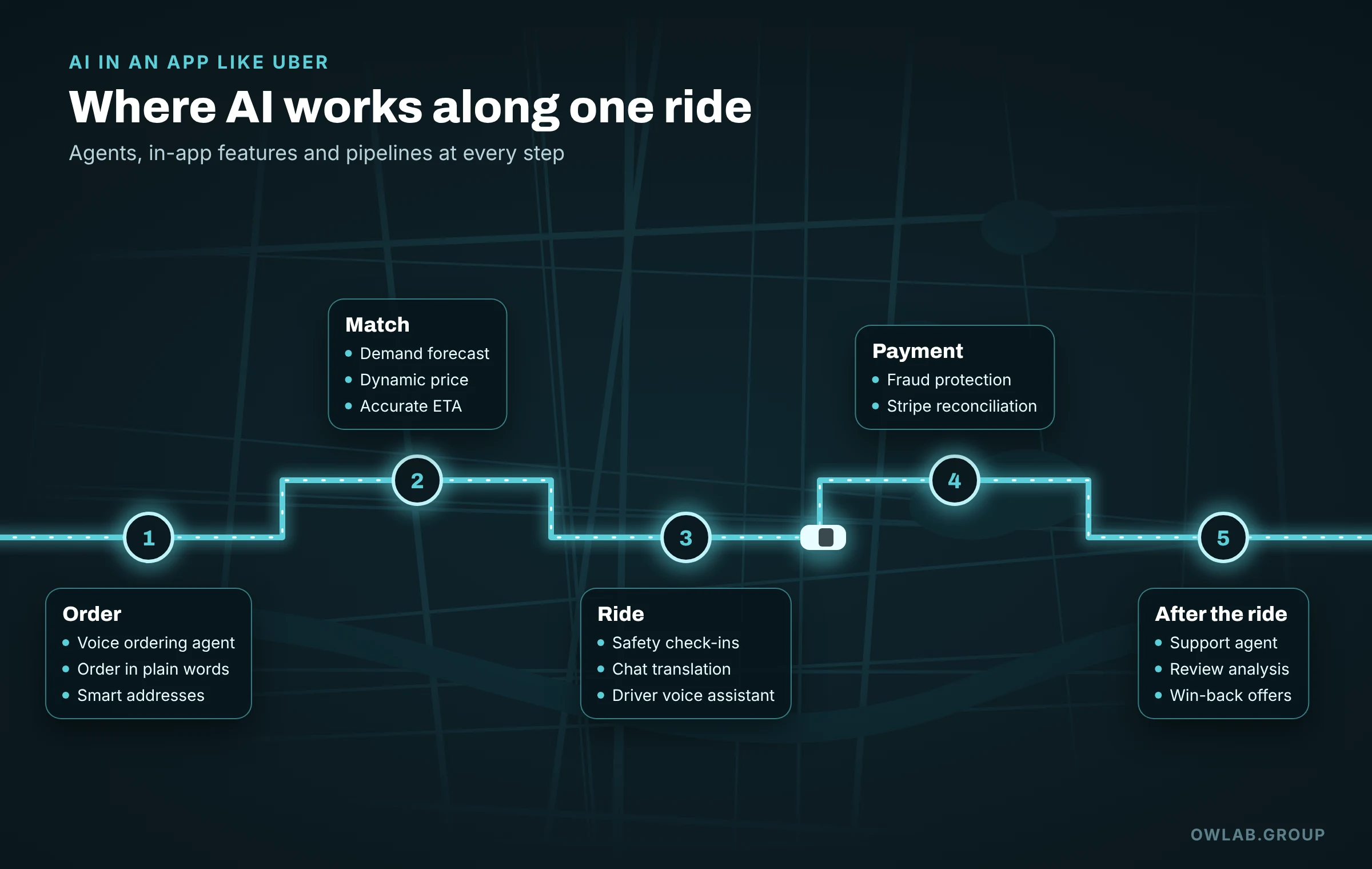
In 2026 AI is more than dynamic pricing like Uber's. It means agents that take over whole areas of work, and features that make the app easier to use. For a small player it is a way to look stronger than competitors without a big team.
AI agents
1. A voice agent for orders. A rider calls a number and books a ride by voice, like with a regular taxi. The agent confirms the address, names the price and creates the order in the system. This matters a lot for older people and for medical transport.
2. A support agent. It answers "where is my driver", "why is the price so high" and "I left something in the car" in chat and on the phone. It issues small refunds by the rules on its own and hands complex cases to a person with the full context.
3. A driver onboarding agent. It reads the driver's license, insurance and car documents from photos. It checks expiry dates, reminds the driver what is missing and prepares the application for a manager to decide. Drivers go online in days, not weeks.
4. A voice assistant for drivers. The driver keeps their hands on the wheel. They accept orders by voice, tell the rider "I'll be there in 5 minutes" and report a problem on the road.
5. An operations agent for the team. Every morning it sends a summary to Slack or Telegram. How many trips there were, where drivers were short, which complaints keep coming back and what needs to be done today. This is how a small team runs a service for a whole city.
AI features inside the app
- Ordering in plain words. "To the train station, and stop at a pharmacy on the way." AI builds the route with the stop.
- Smart addresses. Hints on which entrance is easier for pick-up, based on past trips.
- Chat translation between rider and driver. Useful for tourists and for drivers who are not native speakers.
- Demand forecast. The driver sees on the map where there will be many orders in half an hour and goes there in advance.
- Dynamic pricing and accurate ETA. The model learns from your trips, traffic and weather.
- Fraud protection. AI spots fake GPS, fake accounts and promo code abuse.
- Ride safety. If the car leaves the route or stops for too long, the app asks the rider if everything is OK.
- Review analysis. AI groups complaints by topic and shows which drivers need a conversation.
- Personal offers. A rider who stopped riding gets a discount on their usual route.
AI pipelines for the team
Part of the work doesn't need new screens in the app. It is easier to build as a pipeline on n8n or Make, where AI processes data between your services. These go live in a week or two and are easy to change.
- Driver documents. Document photos → AI reads and checks them → record in the CRM → reminder one month before the insurance expires.
- Complaints and reviews. Review → AI detects the topic and urgency → ticket in the helpdesk → alert in Slack if it is about safety.
- Money reconciliation. Stripe payments → compared with trips and driver payouts → list of mismatches for the accountant.
- B2B invoices. A company's trips for the month → invoice and report by department → email to the client and entry in accounting.
- City event monitoring. Concerts, matches, flight delays → AI estimates where demand will grow → push to drivers in advance. We built a similar pipeline for monitoring news about 1,145 companies.
- Winning riders back. A rider hasn't ridden for two weeks → AI writes a personal message with a promo code → push or email.
- Lost items. Rider request → contact with the driver → return and payment agreed without a dispatcher.
An important note on personal data. Passports, driver's licenses, addresses and people's routes go through these pipelines. So choose services for them with data protection in mind. n8n can run on your own server, so the data never leaves your infrastructure. Connect AI models through business plans or cloud platforms where your data is not used for training and you can choose the storage region, for example the EU for GDPR. Sign a data processing agreement (DPA) with every provider. And where AI doesn't need a name or a phone number, hide them before the data goes to the model.
What to put in the first version
Support, onboarding and voice ordering agents pay off from day one, because they take routine work off people. Demand forecasts, dynamic pricing and fraud protection are better added once you have a history of trips. And one more thing. AI coding tools speed up development itself. But the logic of driver matching, money and safety still has to be designed and checked by a person.
How to build an app like Uber in 6 steps
1. Choose a niche and a city. Not "a taxi for everyone", but a specific audience with a problem that big players solve badly.
2. Test demand before development. Take orders through a landing page, a Telegram bot or even a dispatcher. If people pay for the manual version, the app is worth building.
3. Fix the MVP scope. Only the features from the first list above. Everything else goes to the backlog.
4. Design and prototype. Test the ordering flow with 5–10 real riders and drivers. Drivers often use the app on the move, so they need big buttons and as little text as possible.
5. Development and road tests. Test in a real city, with a weak signal, tunnels and a dying battery. That is where you find bugs that never show up in the office.
6. Launch and driver acquisition. Bring in drivers first, and only then riders. A rider who didn't get a car twice will not come back.
Risks to know in advance
- Chicken and egg. Without drivers there are no riders, and without riders drivers leave. So start in a small zone where it is easier to balance.
- Laws. Transport licenses, the status of drivers as employees or contractors, taxes and personal data processing. The rules differ in every country, and it is better to build them into the product from day one.
- The economics of one trip. The commission has to cover payments, maps, support and acquisition. Calculate this before launch.
- Safety and trust. Driver checks, insurance and a fast response to incidents cannot be postponed.
How much will your app cost?
Tell us about your idea, niche and launch city. We will prepare an estimate with MVP features, timeline and cost. It is free and doesn't commit you to anything.
How to make money
- Commission per trip. The main model, usually 15–25%.
- Subscription for drivers. A fixed fee per day or week instead of a commission. Drivers love it.
- Subscription for riders. Discounts and priority pick-up.
- B2B. Corporate accounts with one monthly invoice.
- Ads and partnerships. Once you have an audience.
Niches where the Uber model still works
- Medical transport and medicine delivery.
- Tow trucks and roadside assistance.
- B2B delivery and freight.
- School and corporate transport.
- Calling a handyman: plumbers, electricians, cleaning.
- Car, scooter and equipment rental with delivery.
All these niches share the same logic: a customer, a provider nearby, a map and a payment. But there is far less competition than in taxis.
What we have already built
We haven't built a taxi clone. But almost every part of such a platform already exists in our projects.
- Maps and a two-sided marketplace. HousingHive is a real estate website and app with an interactive map, filters and two sides, clients and agents.
- Bookings and payments. For a pet hotel platform we built Stripe payments and a ledger that tracks every transaction.
- AI on the support line. An AI receptionist for a telecom company knows who is calling, works with tickets during the call and transfers the call to a person when needed. It is a ready model for a dispatch desk.
- Calls from the street. AI agents for incident intake work with security officers who call straight from the site. The noise and rush are the same as for drivers.
- GPS tracking in a mobile app. Carbon Diem is an iOS and Android app that collects the user's daily movements through Google Places. This kind of tracking is the core of a driver app.
- Unlocking physical objects from a phone. For Spark Keys we built a secure backend, an admin panel and NFC apps that open smart locks. It is a ready base for car sharing or scooter rental.
- A platform for two sides. Rocket Labs connects advertisers and influencers. The logic is the same as Uber's: two different types of users who need to find each other.
- Medical logistics. Viebeg is a platform for tracking medicine stock in medical centers. It is close to the medicine delivery niche mentioned above.
- Booking slots without a person. An AI recruiter texts candidates by SMS and books interviews in the right office's calendar. Scheduled ride orders can work the same way.
Ready to launch your own on-demand service?
We will build your MVP in 4–16 weeks and help you launch in your first city.
FAQ
How much does it cost to build an app like Uber?
It depends on the niche, the number of features in the first version and how many cities you plan to cover. Describe your idea, and we will prepare a free estimate with timeline and cost.
How long does development take?
An MVP takes 4–16 weeks. A platform built to scale takes 4–6 months.
How many apps do you need?
Three: one for riders, one for drivers and an admin panel. The rider and driver apps can share one cross-platform codebase.
What is better, white-label or custom development?
White-label works if you are a taxi fleet and need a standard app. Custom development is needed when the product itself is what sets you apart from competitors.
Do you need AI in the first version?
In support and driver checks it pays off right away. AI-based dynamic pricing is better added once you have a history of trips.
How does an app like Uber make money?
Most often from a commission on every trip. On top of that come subscriptions for drivers and riders, corporate accounts and ads.


